
Download Droppix DVD Maker – Free DVD Authoring Tool for Windows & Mac
Overview
Droppix DVD Maker positions itself as a straightforward solution for anyone who wants to turn digital videos into playable DVD movies without wrestling with complicated settings. The software promises a “piece of cake” experience: you import video files from your hard drive or pull them directly from popular video‑sharing sites such as YouTube, DailyMotion, or Google Video, then let Droppix handle the conversion, menu creation, and burning steps automatically. The program supports the most common video containers (MP4, AVI, MKV, MOV, and more) and offers a handful of pre‑designed menu templates that can be customized with your own images and titles. While the core workflow is simple and the conversion speed is respectable, the tool falls short in a few key areas—most notably the lack of a built‑in preview player and a menu‑editing process that feels a bit clunky. Nonetheless, for users who need a quick, no‑frills way to produce a DVD for home viewing or gifting, Droppix DVD Maker delivers on its primary promise: create a functional DVD movie with minimal effort.
Core Features & Usability
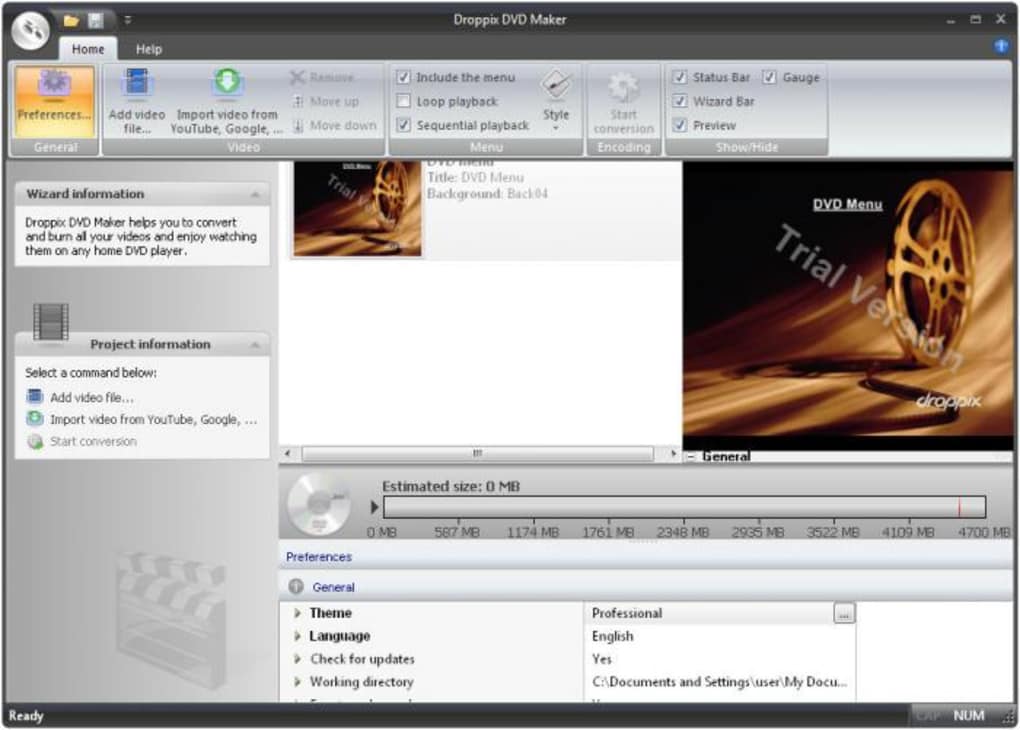
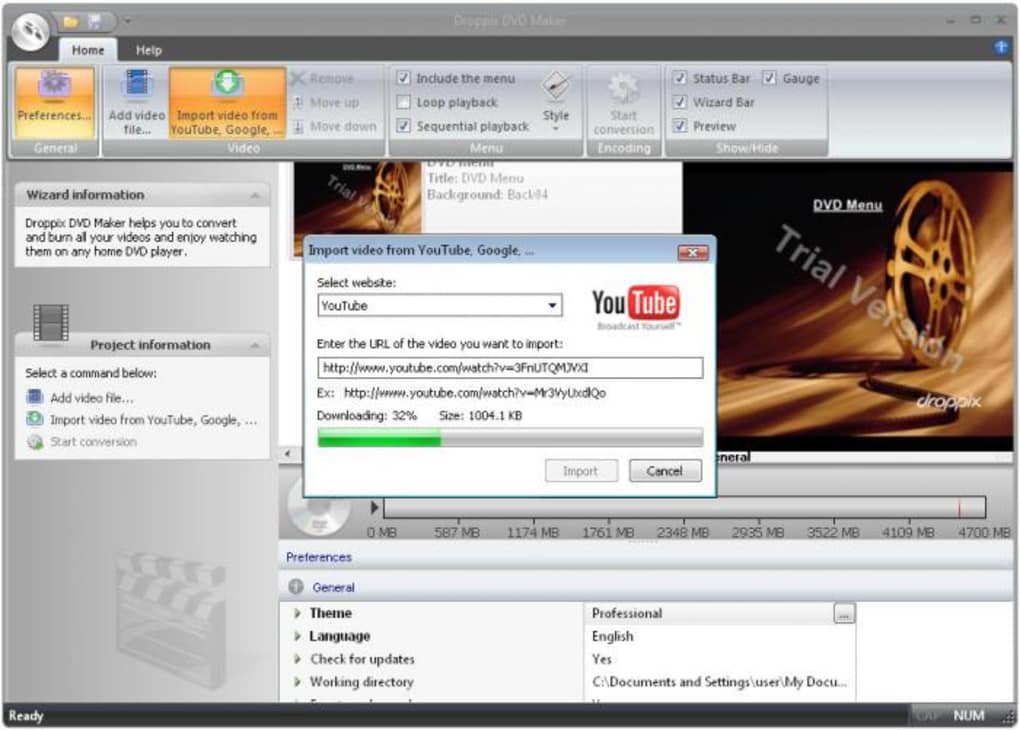
Droppix DVD Maker focuses on a clean, user‑centered interface that guides you through three main stages: import, configure, and burn. After launching the program, you can drag and drop video files into the main window or click the “Import from URL” button to fetch a video directly from a supported website. The software automatically detects the source format and prepares the file for DVD‑compatible encoding (MPEG‑2, 720×480 for NTSC or 720×576 for PAL). This automatic handling eliminates the need for manual codec selection, which can be intimidating for non‑technical users.
The menu system, while limited to a few template options, includes basic customization: you can replace the default background image, edit the title text, and choose between a simple list‑style menu or a graphical thumbnail layout. Although changing a menu currently requires navigating to the Settings dialog rather than a quick double‑click on the preview image, the available options are sufficient for creating a personalized look without delving into graphic design tools.
Below is a concise feature list that captures what Droppix DVD Maker offers out of the box:
- Supports major video formats: MP4, AVI, MKV, MOV, WMV, FLV, etc.
- One‑click import from YouTube, DailyMotion, Google Video.
- Automatic DVD‑compatible conversion (MPEG‑2, 4.3/4.5 Mbps).
- Three ready‑made menu templates with basic text and image editing.
- Fast conversion engine – typical 30‑minute video finishes in under 10 minutes on a mid‑range PC.
- Burns directly to DVD‑R/RW discs or creates ISO images for later use.
- Lightweight installer (< 30 MB) and modest system requirements.
While the absence of a preview player means you must trust the conversion process, the overall workflow remains intuitive: add files, tweak the menu, click “Burn,” and let the software handle the rest. This simplicity is the hallmark of Droppix DVD Maker and makes it a solid choice for families, educators, or small businesses that need to produce DVDs quickly and affordably.
Installation, Compatibility & Performance
Droppix DVD Maker is distributed as a downloadable executable for Windows (7, 8, 10, 11) and a DMG installer for macOS (10.12 Sierra and later). The installation wizard follows the standard “Next‑Next‑Finish” pattern, prompting you only for the destination folder and optional desktop shortcut. No additional codecs or third‑party components are required, as the program bundles its own encoding library. Once installed, the application launches in under five seconds on a typical 8 GB RAM system.
For compatibility, the software declares support for the following operating systems (itemprop="operatingSystem"):
- Windows 7, 8, 10, 11 (both 32‑bit and 64‑bit)
- macOS 10.12 Sierra and newer (Intel‑based Macs; Apple Silicon via Rosetta 2)
Performance-wise, Droppix DVD Maker shines in its conversion speed. The built‑in encoder leverages multi‑core CPUs, achieving an average conversion ratio of 3:1 (source time to output time) on a quad‑core Intel i5 processor. Burn speed defaults to 8× for DVD‑R media, but you can adjust it manually if your drive supports higher rates. The program also offers an “Create ISO” option, which is handy for users who prefer to verify the disc image before burning or who need to distribute the DVD content digitally.
Despite the fast conversion, there are a few practical limitations to note. Because there is no preview player, you cannot scrub through the video to check for glitches before burning. Additionally, the menu editor requires you to exit the main window to access the Settings panel, which can interrupt the workflow. Nevertheless, the overall stability is solid: crashes are rare, and error messages are clear when a disc fails to write (e.g., “Disc not detected – please insert a writable DVD”).
Pros, Cons, FAQ & Final Verdict
Pros
- Very easy-to-use interface—ideal for beginners.
- One‑click video import from major streaming sites.
- Fast conversion and burning speeds.
- Lightweight installer and low system footprint.
- Supports both Windows and macOS platforms.
Cons
- No built‑in video preview before burning.
- Menu editing is not as intuitive as it could be.
- Limited number of menu templates; advanced customization is missing.
- Only DVD output—no Blu‑ray or digital streaming options.
Frequently Asked Questions
Can Droppix DVD Maker import videos from sites other than YouTube?
Yes. In addition to YouTube, the software supports DailyMotion and Google Video. For other platforms you can download the video first and then import the local file.
Is there a free version of Droppix DVD Maker?
Droppix DVD Maker is offered as a fully functional free download. There are no hidden fees, but the free version does not include premium menu templates or advanced video editing tools.
What disc formats can I burn with Droppix?
The program can burn to DVD‑R and DVD‑RW discs. It also allows you to create an ISO file, which you can later mount or burn with another utility.
Does Droppix DVD Maker work on Apple Silicon Macs?
Yes, the macOS version runs under Rosetta 2 on Apple Silicon devices, providing comparable performance to Intel‑based Macs.
Can I preview my DVD menu before burning?
Unfortunately, Droppix DVD Maker does not include a menu preview feature. You must trust the settings you applied or burn a short test disc to verify the layout.
Conclusion & Call to Action
Droppix DVD Maker delivers exactly what its tagline promises: a quick, uncomplicated way to turn your favorite videos into a standard DVD movie. Its strengths lie in the seamless import from popular video sites, a fast conversion engine, and a user‑friendly workflow that requires virtually no technical knowledge. If you are looking for a free tool that gets the job done without the bloat of professional authoring suites, Droppix is a solid pick.
However, power users may feel constrained by the lack of a preview player, limited menu customization, and the absence of Blu‑ray or digital‑output options. For those scenarios, you might want to explore more feature‑rich alternatives. Still, for families creating home movies, teachers preparing video lessons, or small businesses needing a quick demo disc, Droppix DVD Maker hits the sweet spot of simplicity and speed.
Ready to give it a try? Download Droppix DVD Maker now and start building your own DVD collection today—securely, for free, and with just a few clicks.







